
We use cookies to provide the best site experience
We use cookies to provide the best site experience
3 Ways to Make Your Airbnb Listing More Effective
Reading time – 4 minutes

Learn how to increase your apartment profit without major expenses
Alex Kolokolov
CEO at Hospitality Research
CEO at Hospitality Research
Platform
Knowledge base
Plans
Platform
Knowledge base
Plans
What features of listings influence bookings?
In reality, there are many factors to name a few:
But among these factors, there is one that can easily be influenced: the listing. Changing the room price will impact profitability, renovating a room will cost a lot, but improving the listing can be done quickly and inexpensively.
- Location;
- Design;
- Room size and amenities;
- Price and promotions.
But among these factors, there is one that can easily be influenced: the listing. Changing the room price will impact profitability, renovating a room will cost a lot, but improving the listing can be done quickly and inexpensively.
Effective listing on booking platforms from A to Z
Let’s look at a real listing and break down its components. For this example, we’ll use an Airbnb listing (we've removed the property name for privacy reasons).
Room Photos
It’s important to showcase the room from different angles — the bed, the desk, the shower. It’s best if the photos are taken with a professional camera and edited for quality.
It’s important to showcase the room from different angles — the bed, the desk, the shower. It’s best if the photos are taken with a professional camera and edited for quality.
Property name
Briefly describe here the type of property (a room or an entire apartment) and highlight the advantages.
Briefly describe here the type of property (a room or an entire apartment) and highlight the advantages.
Special Badges
Here, the user can see the property’s highlighted advantages, such as the host’s name, rating, and awards.
Here, the user can see the property’s highlighted advantages, such as the host’s name, rating, and awards.
Room Price
Here, the user can see the total cost, including the service fee, tax, and cleaning fee.
Here, the user can see the total cost, including the service fee, tax, and cleaning fee.
Additional information
This includes the host’s name, free cancellation policies, and awards.
This includes the host’s name, free cancellation policies, and awards.
Text Description
Here you can provide a more detailed description of the property’s amenities. Do you offer self-check-in at any time, or perhaps orthopedic mattresses and a coffee machine?
Make sure to mention this in the text section!
Here you can provide a more detailed description of the property’s amenities. Do you offer self-check-in at any time, or perhaps orthopedic mattresses and a coffee machine?
Make sure to mention this in the text section!
Sleeping Arrangements
In this section, you will provide information about the rooms, number of beds, and bed sizes.
In this section, you will provide information about the rooms, number of beds, and bed sizes.
Here we have covered the most important parts of the listing. Additionally, users also pay attention to information about the host, check-in and check-out times, and safety.

Room Amenities
In this section, you need to list the amenities available in the room. It’s important to include everything, but avoid listing anything that’s not provided — otherwise, guests may leave a negative review or even file a complaint with customer support.
In this section, you need to list the amenities available in the room. It’s important to include everything, but avoid listing anything that’s not provided — otherwise, guests may leave a negative review or even file a complaint with customer support.
Location
Location is important both for tourists, who prefer to stay in the city center, and for business travelers, who value proximity to their workplace.
Location is important both for tourists, who prefer to stay in the city center, and for business travelers, who value proximity to their workplace.
Reviews
For many users, the reviews section is the most important — here, guests can mention less obvious issues, share tips, and describe their experience with the host. For many, it’s not just the content of the reviews that matters, but also their presence. A property without reviews lacks "social proof," meaning that there’s no assurance that the previous guests who have stayed there were satisfied.
For many users, the reviews section is the most important — here, guests can mention less obvious issues, share tips, and describe their experience with the host. For many, it’s not just the content of the reviews that matters, but also their presence. A property without reviews lacks "social proof," meaning that there’s no assurance that the previous guests who have stayed there were satisfied.
Why does the appearance of the listing matter?
Statistics show that up to 70% of all hotel rooms (and apartments) in the USA are booked online, which means that users will view your hotel’s listing before booking.
And how it looks will determine whether they decide to book a room.
Statistics show that up to 70% of all hotel rooms (and apartments) in the USA are booked online, which means that users will view your hotel’s listing before booking.
And how it looks will determine whether they decide to book a room.
— To find out what exactly influences rental property profits, we have analyzed over 30,000 listings
— The result is packed with learning sessions and tools
— Start a demo to know more and boost bookings
— The result is packed with learning sessions and tools
— Start a demo to know more and boost bookings
Start a demo
The reason why you fail on booking platforms (spoiler: photos)
Let’s take a closer look at photos: they immediately show the user the room’s amenities, size, and design. And even though we all try to make logical decisions, our subconscious often decides for us — if the photos are appealing, the client might overlook potential shortcomings.
Below, we will list the main rules for working with photos:
Below, we will list the main rules for working with photos:
Number of Photos
Don’t use a few photos — the user should get a complete picture of where they’ll be spending their time. Show the room from multiple angles so the user can better grasp the layout and features of the space. Take photos of the sleeping area, kitchen, bathroom, living room, and all other important areas. Include a photo of the building’s exterior and surrounding area if they could play a significant role in the decision-making process.
On the other hand, if you add too many photos, it could overwhelm the user (especially if they are repetitive). Attention is a valuable resource in this information age, and no one wants to waste time looking at the twentieth similar photo.
The optimal number of photos is 10−12.
Don’t use a few photos — the user should get a complete picture of where they’ll be spending their time. Show the room from multiple angles so the user can better grasp the layout and features of the space. Take photos of the sleeping area, kitchen, bathroom, living room, and all other important areas. Include a photo of the building’s exterior and surrounding area if they could play a significant role in the decision-making process.
On the other hand, if you add too many photos, it could overwhelm the user (especially if they are repetitive). Attention is a valuable resource in this information age, and no one wants to waste time looking at the twentieth similar photo.
The optimal number of photos is 10−12.
Layout and Angle
Use a wide-angle camera or lens to capture more space. This will give the user a better understanding of the room’s size and layout.
Use a wide-angle camera or lens to capture more space. This will give the user a better understanding of the room’s size and layout.
In this photo, only a part of the wardrobe is visible. Such a photo provides little information about the room.

In this photo, the entire room is visible, which gives a better understanding of the property.

Try to take photos at eye level and keep the shots straight to avoid distortion. Use the grid feature on your camera to maintain the correct angle.
In this example, the shooting angle is significantly skewed
Let’s fix it. Does it look better now?
Brightness, Contrast, and Saturation
The human psyche is wired to perceive brighter and more contrasting photos as more appealing. Photographers and designers take advantage of this, spending time on lighting and post-processing. But even if you’re not a professional, you can easily enhance your photos using online tools to adjust brightness, contrast, and saturation. Make the photos visually appealing, but don’t overdo it to avoid an unrealistic effect.
Let’s take a look at some examples.
The human psyche is wired to perceive brighter and more contrasting photos as more appealing. Photographers and designers take advantage of this, spending time on lighting and post-processing. But even if you’re not a professional, you can easily enhance your photos using online tools to adjust brightness, contrast, and saturation. Make the photos visually appealing, but don’t overdo it to avoid an unrealistic effect.
Let’s take a look at some examples.
In the example on the left, the photo looks dark and dull — such a photo won’t attract the user’s attention.
After color correction, the photo looks much better.
Shoot during the daytime when the room gets the most natural light. This will make the photos brighter and more attractive.
Also, make sure to remove any unnecessary items from the frame and tidy up — a messy room will drastically lower the booking conversion rate.
before
after
Plan to improve the visual part of your listings.
- Use up to 10−12 photos; show all the important details: shower, bed, workspace, kitchen.
- Hire a professional photographer; if that’s not an option, use the camera of a modern smartphone.
- If you’re taking photos yourself, use the wide-angle feature to capture more details; use the "grid" tool in the camera app to help align the right angle.
- After taking the photos, edit them if necessary — increase contrast and enhance color saturation.
In addition to the knowledge base, we’ve developed a platform that will help you experiment with your listing and suggest the most effective option.
A: Blue doesn’t matter, but yellow is better for holidaymakers. Also, you can analyze age, gender, education and preferences and make the best offer for your guests!
The Hospitality Knowledge Base includes practical tools that you can implement within a month to increase your rental property’s profit and occupancy.
Use AI for your listing!
Was the article useful? We’ve prepared much more
Q: Which color should I paint my walls to get more bookings?
main web-site
contact us
Booking Intentions
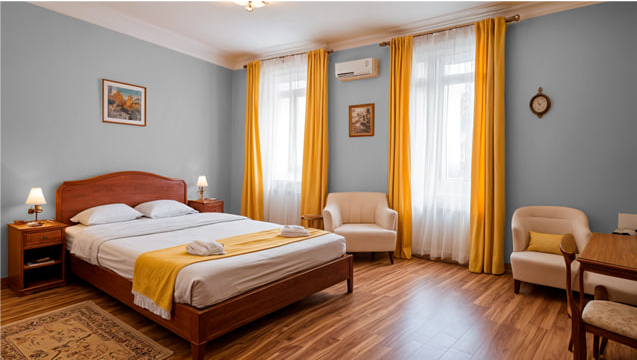
78%
Business trip
82%
Vacation
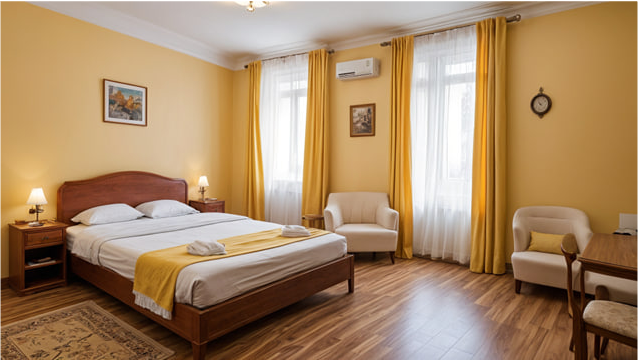
Booking Intentions
69%
Business trip
85%
Vacation
— To find out what exactly influences rental property profits, we have analyzed over 30,000 listings
— The result is packed with learning sessions and tools
— Start a demo to know more and boost bookings
— The result is packed with learning sessions and tools
— Start a demo to know more and boost bookings
Start a demo
Sign up for our newsletter
Get guest experience news and practical tips to boost bookings on Airbnb and booking.com
*I accept privacy policy and can unsubscribe at any time.
Let’s improve your listings on booking platforms
Fill out the form and check the data is correct.
© 2024 Data 2 Speak Incorporated
7901 4TH ST N STE 300 ST. PETERSBURG, FL. US 33702
7901 4TH ST N STE 300 ST. PETERSBURG, FL. US 33702